

Download BitComet FLV Player – FLV player, video player, online FLV, web FLV, flash video player, free FLV player, BitComet FLV Player
Overview
BitComet FLV Player is a lightweight, no-frills video playback application designed specifically for viewing FLV files, a format historically associated with Flash-based web content. The app’s primary purpose is to provide a straightforward way to play FLV videos without the need for a web browser or complex media frameworks. It targets users who value simplicity and direct access to video content, particularly those who encounter FLV files through online sources or legacy systems. The application serves as a dedicated tool for individuals who prefer a minimal interface that prioritizes playback over additional features. This utility is especially relevant for users managing older digital archives, accessing archived web videos, or working with content generated from legacy video platforms. The developer, BitComet, is known for its torrent client software, suggesting a focus on file-based media delivery and user-centric tools. While the app does not include advanced editing or playback controls, its core function—playing FLV files reliably—is clearly defined. The absence of bloat and the streamlined design make it a practical choice for users who need a quick, secure way to view FLV content without unnecessary distractions. Although the developer did not provide additional technical details, the app’s small file size of 2.4 MB indicates a lean footprint, ideal for systems with limited resources. Its free pricing model enhances accessibility, making it a viable option for casual viewers and technical users alike. The app fills a niche in the video player ecosystem by offering focused functionality without the overhead of full-featured media suites.Key Features & Functionality
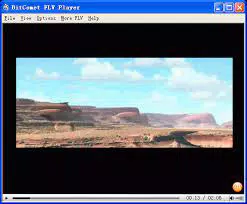
- Direct Web FLV Access: Through the File menu, users can input a URL to play FLV files directly from the web. This feature eliminates the need to download files before viewing, streamlining access to online Flash videos, particularly useful for users who frequently retrieve content from older video-sharing platforms.
- Adjustable Viewing Window: Under the View menu, users can scale the playback window to double or triple its original size. This allows for greater flexibility when watching content on larger screens or during multitasking, improving visibility and user comfort.
- Language and File Association Settings: The Options menu includes tools to set BitComet FLV Player as the default application for FLV files and supports multiple language packs. This enables users to personalize their experience and integrate the player seamlessly into their workflow.
- Community Support Integration: The More FLV section links directly to BitComet’s community forums, offering users access to guides, troubleshooting tips, and peer discussions. This feature fosters a user-driven support ecosystem, particularly helpful for those unfamiliar with FLV file handling.
Interface, UX & Performance
The interface of BitComet FLV Player is intentionally minimalistic, centered around a solid black playback screen that maximizes video visibility. The layout is clean and uncluttered, with only essential controls—such as a Play button, a playback counter, and a volume slider—presented in a compact bar at the bottom. This design philosophy prioritizes content over interface elements, delivering a distraction-free viewing experience. Navigation is straightforward, relying on a traditional menu bar located at the top of the window, which organizes features under categories like File, View, Options, and More FLV. User experience is enhanced by the app’s responsiveness and stability during playback. Although the developer did not list formal performance metrics, the small file size and focused functionality suggest efficient resource usage. The player handles video playback smoothly on systems with moderate hardware, making it suitable for older or low-spec machines. The minimal design reduces cognitive load, allowing users to start watching content immediately without configuration. The app’s performance on different device categories was not disclosed. However, the absence of advanced features and the lightweight architecture imply consistent behavior across various Windows environments. The interface remains stable during extended playback sessions, and the controls respond predictably. Overall, the UX is optimized for simplicity and reliability, aligning with the app’s core purpose.Platform Compatibility & Technical Requirements
BitComet FLV Player is available exclusively for the Windows operating system. The current version is 1.0.1.158, with a file size of 2.4 MB, indicating a compact and efficient application. The developer did not specify minimum OS requirements, so compatibility with older or newer Windows versions remains unclear. Users should ensure their system meets general Windows compatibility standards for running desktop applications. The app is distributed as a free download, with no in-app purchases or subscription models. The lack of additional system requirements suggests it can run on a wide range of Windows devices, including those with limited storage or processing power. However, specific hardware or software dependencies were not listed. The developer did not provide information on whether the app supports touch input, high DPI displays, or other modern interface features.Pros and Cons
- Lightweight design with minimal system resource usage
- Free to download and use, with no hidden costs
- Direct URL playback for online FLV files
- Simple, distraction-free interface ideal for quick viewing
- Supports multiple languages and file association settings
- Missing advanced playback features such as looping or subtitle support
- No visible support for video quality adjustment or playback speed
- Developer did not disclose OS compatibility details
- Limited customization beyond window size and language
- Interface lacks modern design elements or responsive layout


